Document ID# 1205250
1998 Saturn SL2/SC2/SW2
 

Valvebody Cover Replacement

Removal Procedure

    Object Number: 865479  Size: SH
    Click here for detailed picture of above image.
  1. Remove the air cleaner and duct assembly. Refer to Air Cleaner Housing and Duct Assembly Replacement in HVAC.
  2. Caution

    Refer to Battery Disconnect Caution in Cautions and Notices.


    Object Number: 863525  Size: SH
    Click here for detailed picture of above image.
  3. Disconnect the negative battery cable from the battery.
  4. Disconnect the positive battery cable from the battery.
  5. Remove the hold-down retaining nut and screws, and lift the nut and screws off the battery hold-down retainer.
  6. Lift the battery out of the vehicle, and place the battery in a safe location.

  7. Object Number: 890474  Size: SH
    Click here for detailed picture of above image.
  8. Disconnect the powertrain control module (PCM) J2 (black 28-way) harness connector by moving the locking device toward fender.
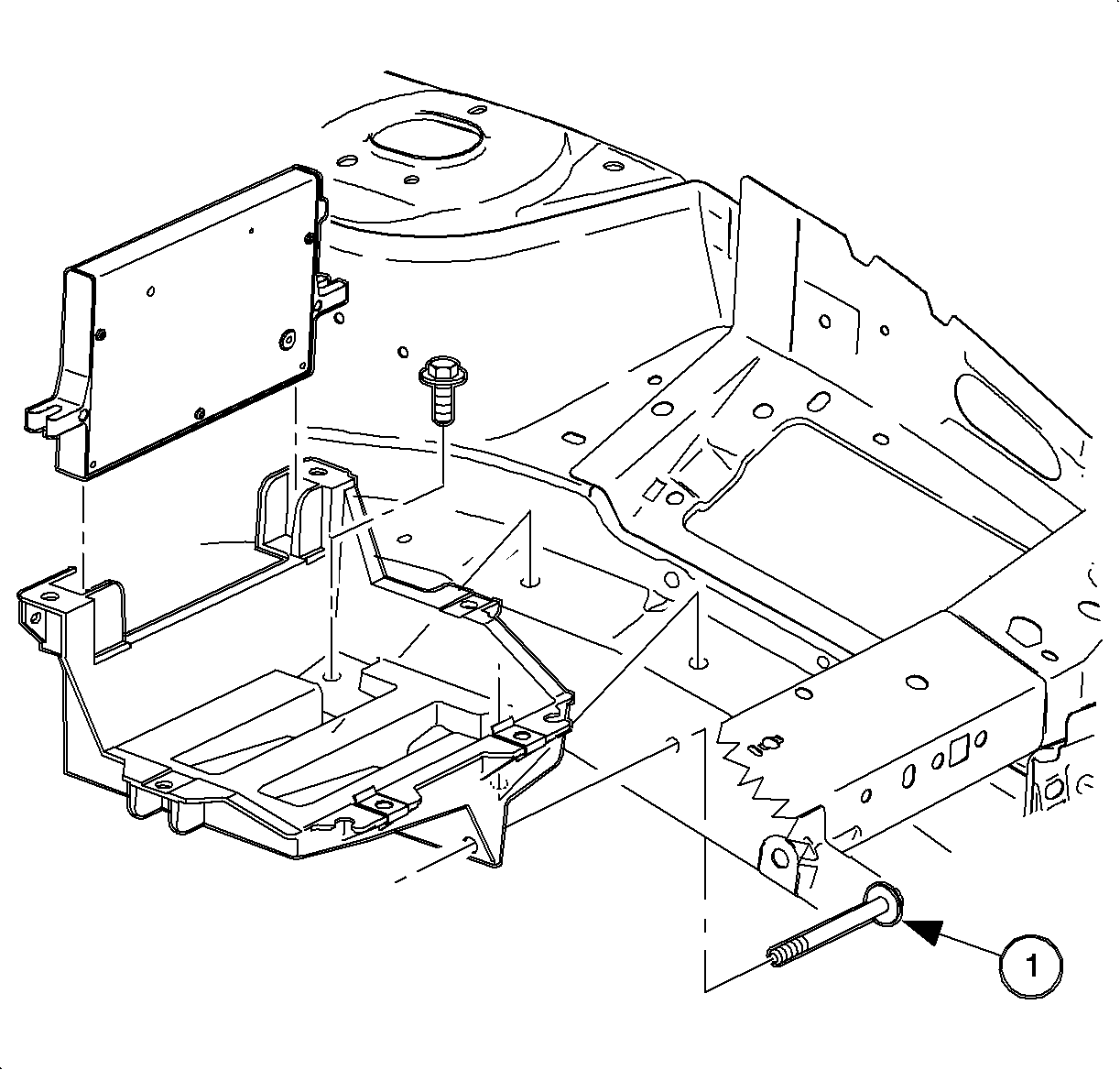
  9. Remove the PCM attachment bolts.
  10. Remove and flip the PCM on its side, out of the way.
  11. Remove the battery tray bolts and tray.
  12. One bolt is located in the fender well.

  13. Object Number: 863627  Size: SH
    Click here for detailed picture of above image.
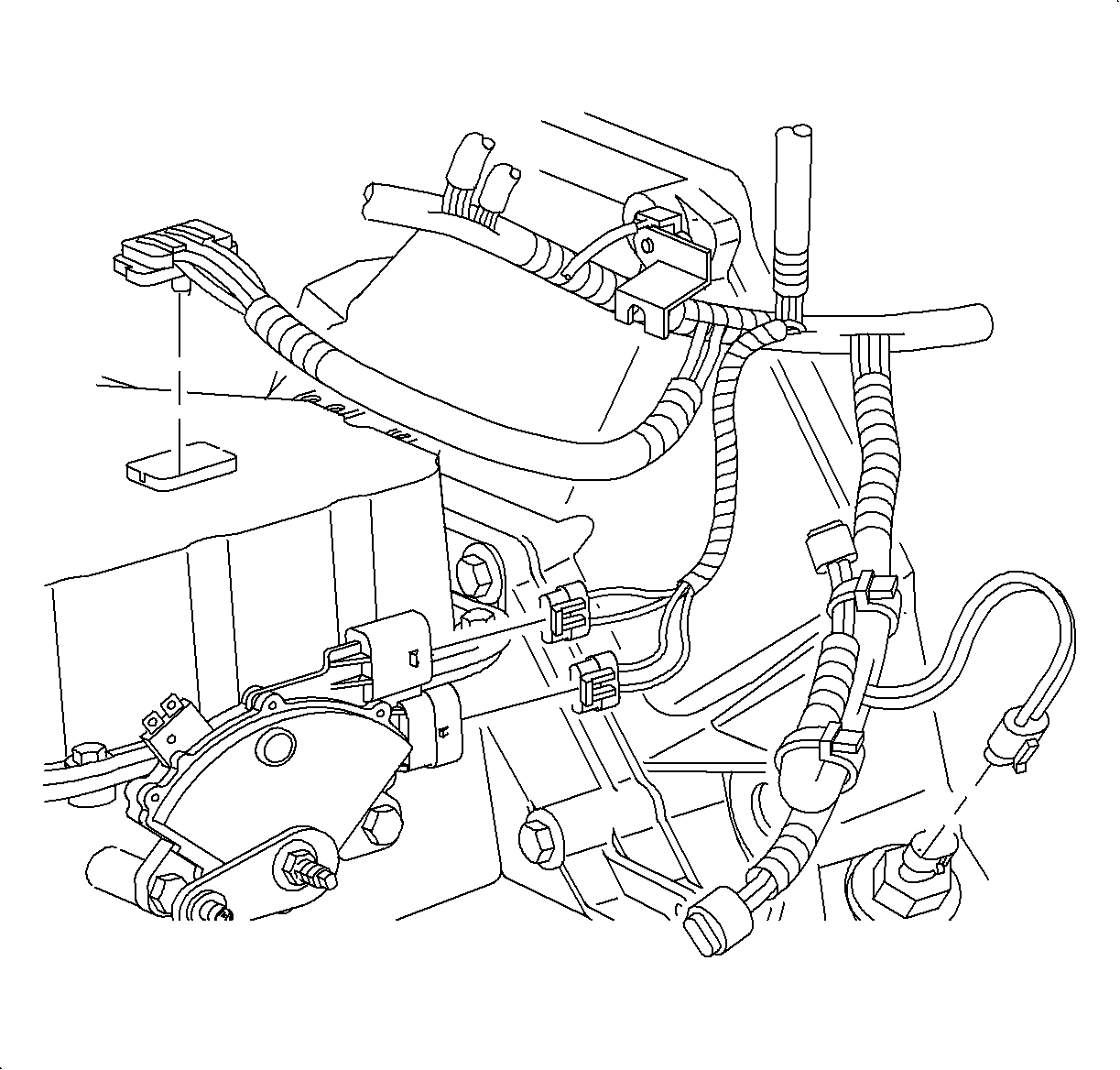
  14. Back out the transaxle connector bolt and disconnect the transaxle connector.

  15. Object Number: 863629  Size: SH
    Click here for detailed picture of above image.

    Notice

    ABS equipped vehicles require the master cylinder to be moved off booster studs and the ABS mid-rail bracket bolt removed to allow the system to be lifted slightly for removal of the valvebody cover. Use care not to bend or kink brake lines. After removing the valvebody cover place the master cylinder back on the booster studs.

  16. For anti-lock brake system (ABS) equipped vehicles, remove the master cylinder-to-booster nuts and the ABS mid-rail bracket bolt.
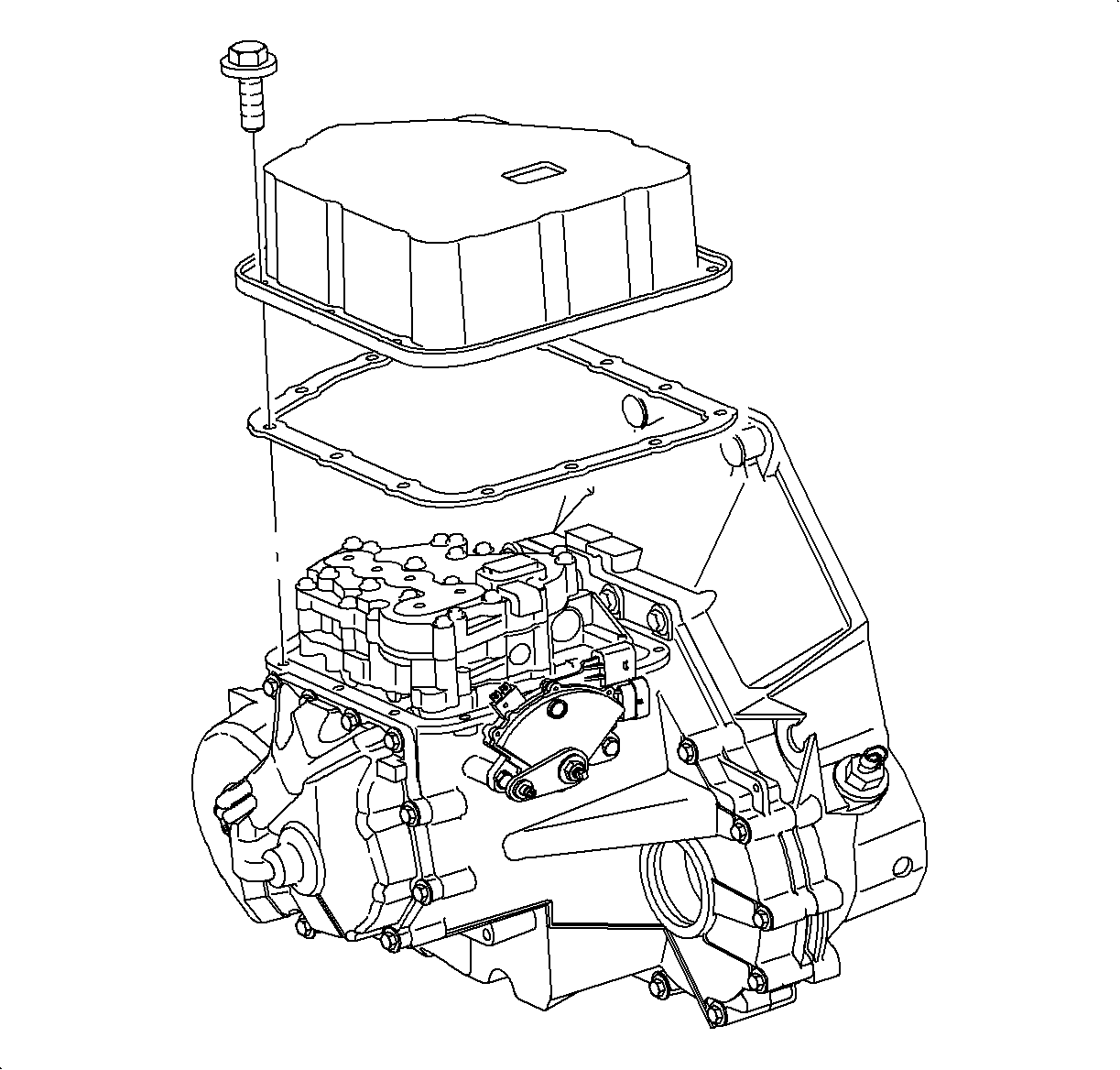
  17. Remove the valvebody cover.
Installation Procedure

    Object Number: 864991  Size: SH
    Click here for detailed picture of above image.
  1. Clean the transaxle case and the valvebody cover sealing surfaces with Saturn Choke and Brake Cleaner or equivalent, applied with a clean shop towel.
  2. Important

    Install the new gasket during reassembly.

  3. Align the valvebody cover gasket on the valvebody cover and install on the transaxle case.
  4. Notice

    Refer to Fastener Notice in Cautions and Notices.

    Important

    Clean and lubricate the fasteners with Saturn Transaxle Fluid. Wipe off excess fluid.

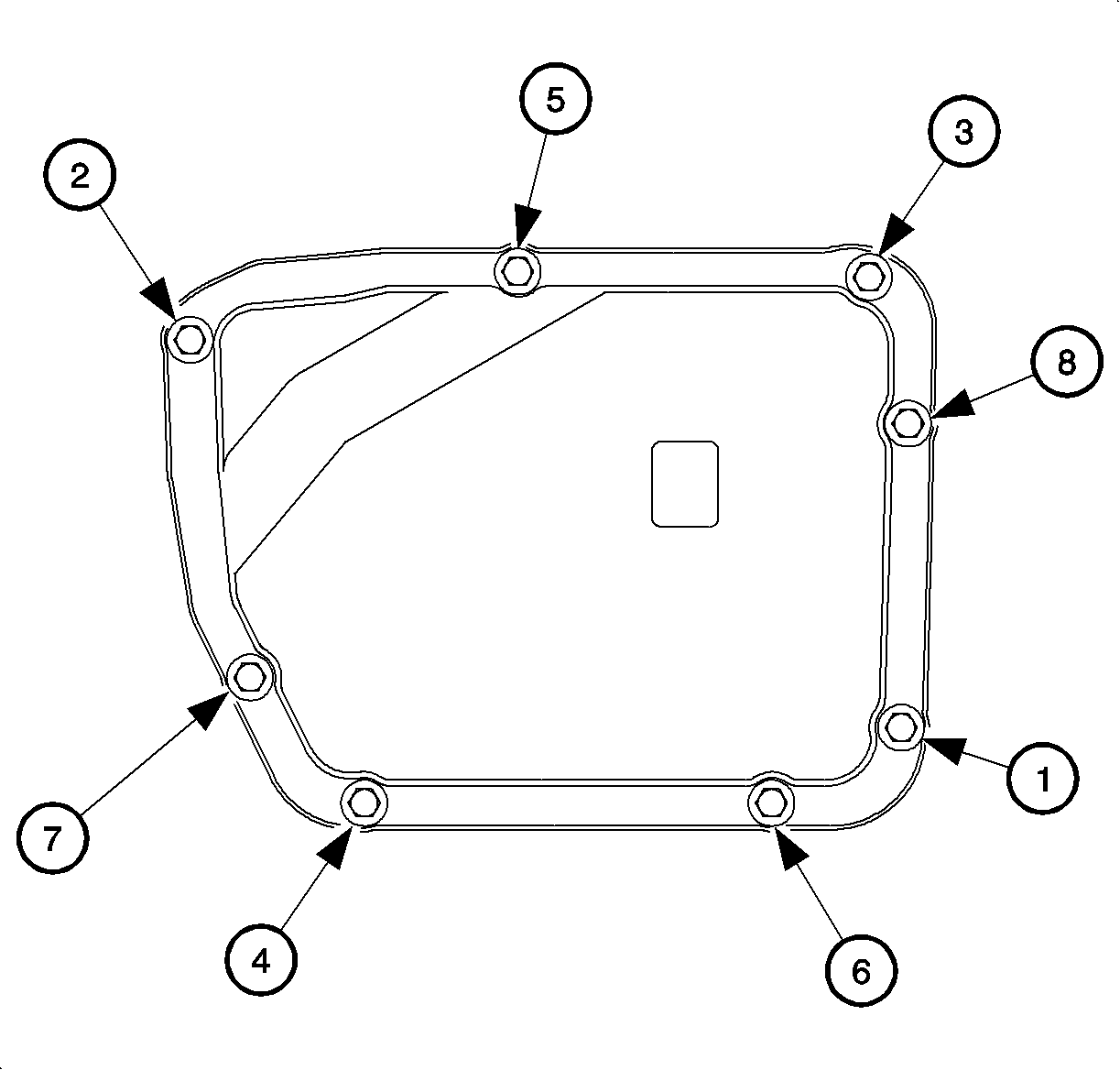
  5. When installing the valvebody cover, ensure to properly torque the valvebody cover bolts using the torque sequence shown.
  6. Tighten

    Tighten the valvebody cover-to-case bolts to 12 N·m (9 lb ft).
  7. Verify the torque of the valvebody cover bolts to account for gasket relaxation using the torque sequence shown.
  8. Tighten

    Tighten the valvebody cover-to-case bolts to 12 N·m (9 lb ft).


    Object Number: 863627  Size: SH
    Click here for detailed picture of above image.
  9. Install and torque the master cylinder-to-booster nuts.
  10. Tighten

    Tighten the brake master cylinder-to-booster nuts to 27 N·m (20 lb ft).

  11. Install and torque the ABS mid-rail bracket bolt.
  12. Tighten

    Tighten the ABS bracket-to-midrail bolt to 16 N·m (9 lb ft).

  13. Connect the transaxle solenoid harness connector.
  14. Notice

    Do not over-tighten or damage to the connector plate may occur.

  15. Tighten the transaxle connector bolt.
  16. Tighten

    Tighten the transaxle electrical connector bolt to 3 N·m (27 lb in).

    Object Number: 890474  Size: SH
    Click here for detailed picture of above image.
  17. Install the battery tray.
  18. Install the battery tray bolts. One bolt is located in the fender well.
  19. Tighten

    Tighten the battery tray-to-frame rail bolt to 10 N·m (89 lb ft).

  20. Install the PCM and the attachment bolts.
  21. Tighten

    Tighten the PCM-to-battery tray bolts to 6 N·m (53 lb ft).

  22. Connect the PCM J2 black 28-way connector and engage the locking device.
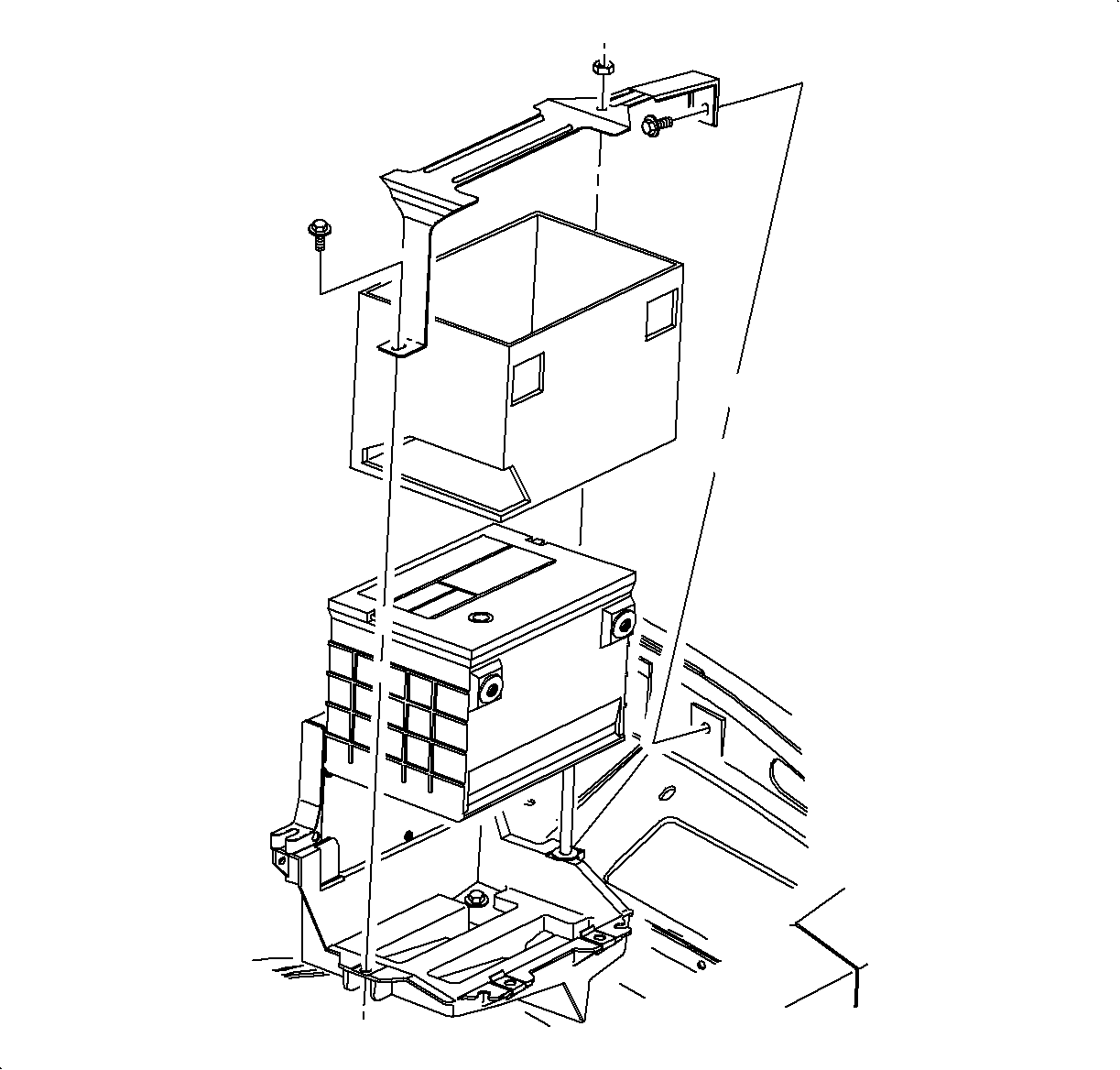
  23. Object Number: 863525  Size: SH
    Click here for detailed picture of above image.
  24. Ensure the battery tray is clean.
  25. Ensure the battery cable ends are clean and free of corrosion. Clean with a wire brush.
  26. Ensure the battery is in good physical condition (e.g., no cracks, or obvious damage) and the terminals are clean.
  27. Install the battery carefully in the battery tray; ensure the terminals do not short against any metal during installation.
  28. Install the battery hold-down retainer, locking the battery into the tray. Install and tighten the hold-down retainer nut and screws.
  29. Tighten

    Tighten the battery case bracket stud and nut to 9 N·m (80 lb ft).

  30. Install the positive battery cable first.
  31. Tighten

    Tighten the battery terminal bolts to 17 N·m (13 lb ft).
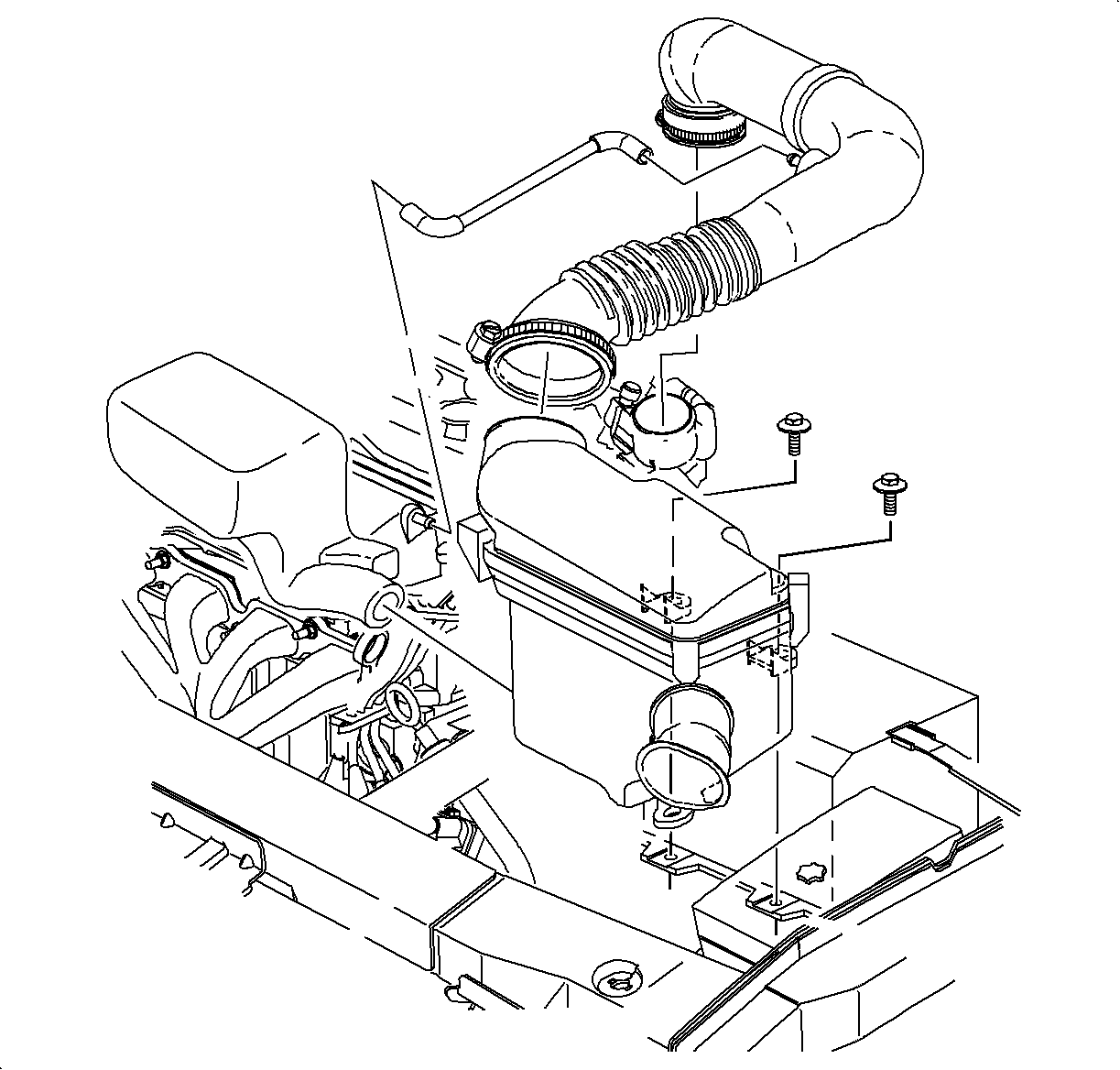

    Object Number: 865479  Size: SH
    Click here for detailed picture of above image.
  32. Install the negative battery cable last.
  33. Tighten

    Tighten the battery terminal bolts to 17 N·m (13 lb ft).

  34. Install the air cleaner and duct assembly. Refer to Air Cleaner Housing and Duct Assembly Replacement in HVAC.
  35. Set the clock.

  Document ID# 1205250
1998 Saturn SL2/SC2/SW2