Document ID# 877760
1998 Saturn SL2/SC2/SW2
 

Battery Replacement

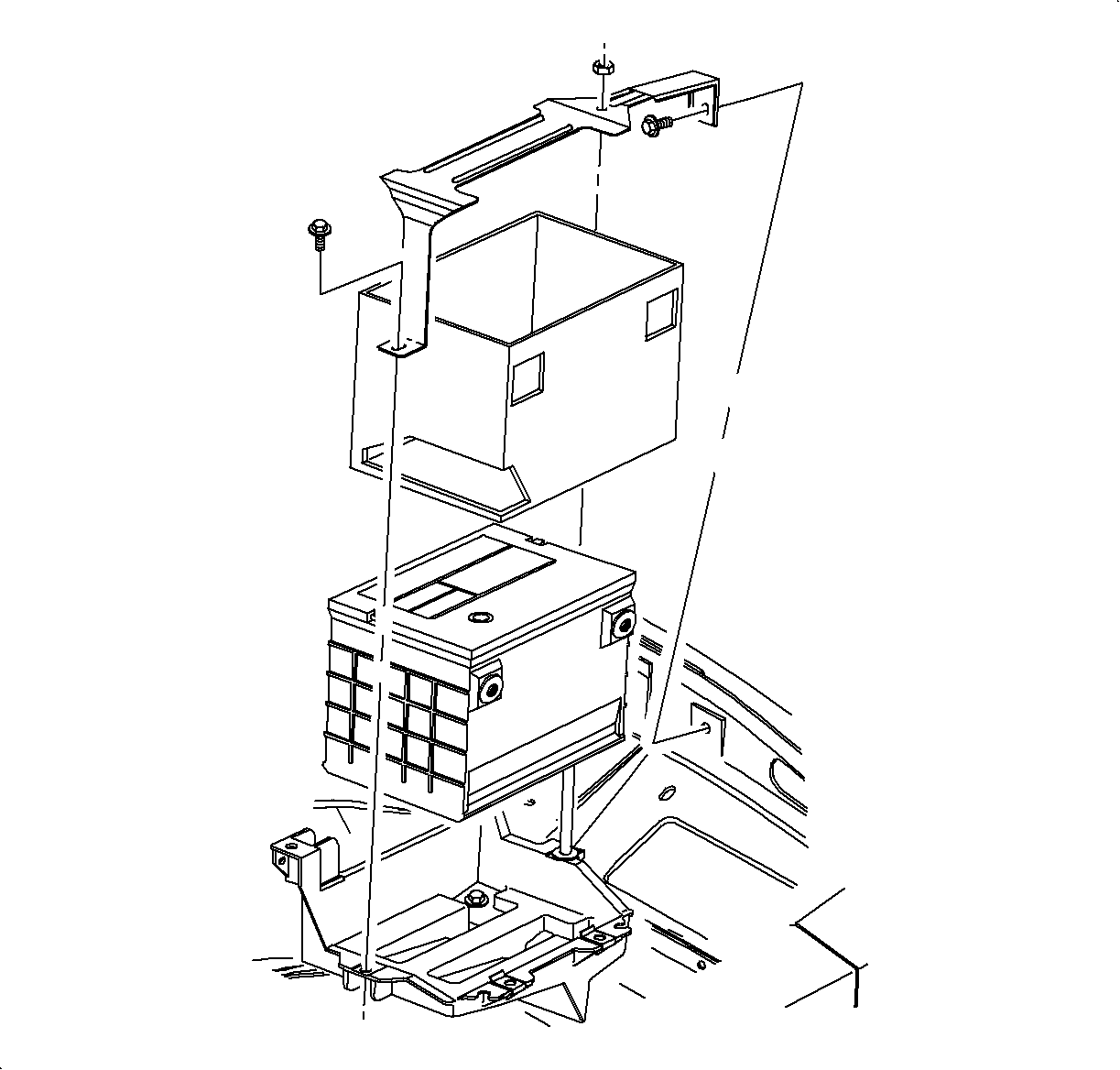
richpin06a Battery Hold Down Removal

richpin06a Poor Man's Battery Load Test

richpin06a checking production date automotive battery

Removal Procedure

    Object Number: 870902  Size: SH
    Click here for detailed picture of above image.

    Important

    Record pre-set radio stations.

  1. Disconnect the negative battery cable.
  2. Disconnect the positive battery cable.
  3. Remove the battery insulating cover.
  4. Remove the battery hold down bracket.
  5. Caution

    Do not tip the battery over a 45 degree angle or acid could spill causing serious personal injury.

  6. Remove the battery.
Installation Procedure

    Object Number: 863522  Size: SH
    Click here for detailed picture of above image.
  1. Verify the battery tray is clean.
  2. Install the battery.
  3. Notice

    Refer to Fastener Notice in Cautions and Notices.

  4. Install the battery hold down bracket.
  5. Tighten

    Tighten the battery case bracket stud and nut to 9 N·m (80 lb ft).

    Notice

    Battery life is reduced if a battery insulation cover is not used.

  6. Install the battery insulating cover.
  7. Verify the battery cable ends are clean and free of corrosion. Clean with a wire brush.
  8. Connect the positive battery cable.
  9. Tighten

    Tighten the battery terminal bolts to 17 N·m (13 lb ft).

    Important

    Set the clock and radio pre-set stations.

  10. Connect the negative battery cable.
  11. Tighten

    Tighten the battery terminal bolts to 17 N·m (13 lb ft).


  Document ID# 877760
1998 Saturn SL2/SC2/SW2