
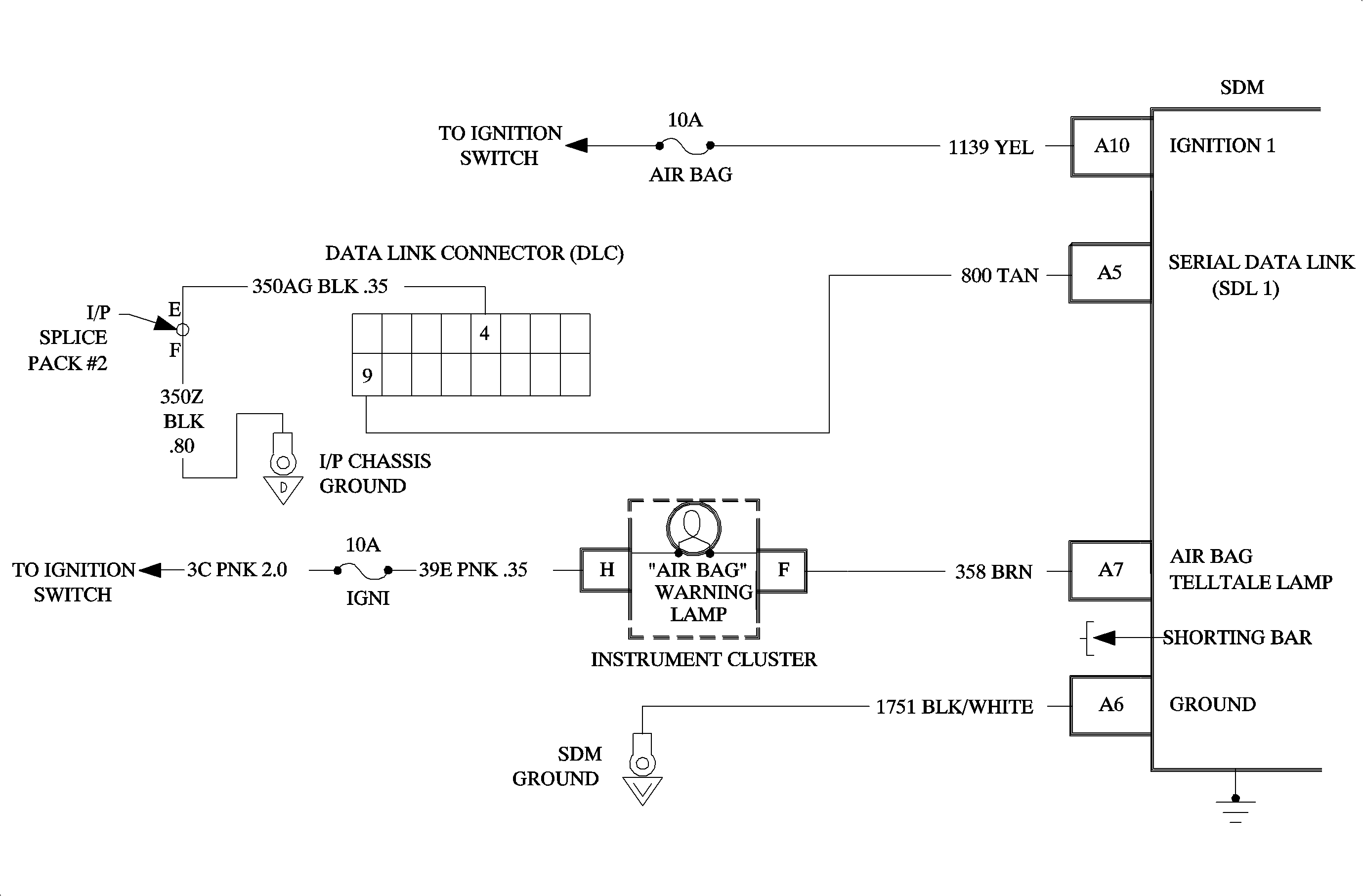
When the ignition switch is first turned ON, "Ignition 1" voltage is applied to the AIR BAG telltale lamp which is connected to the "AIR BAG" terminal A7 of the SDM. The AIR BAG fuse applies system voltage to the "Ignition 1" input terminal A10 of the SDM. The SDM responds by flashing the AIR BAG telltale lamp seven times by providing a ground. If "Ignition 1" is outside the normal operating voltage range (approximately 9 VDC to 16 VDC), the AIR BAG telltale lamp will come ON solid with no diagnostic trouble code set.
The numbers below refer to the step numbers on the diagnostic table.
This step checks to make sure the Scan tool is properly connected to the DLC.
This step verifies the proper software package.
This step checks for a short to ground on the Serial Data circuit.
This step checks for an open in the "Serial Data" circuit.
This step checks for a short to the battery, B+, on the "Serial Data" circuit.
When measurements are requested in this chart, use SA 91114NEDVM with correct terminal adapter from SA 9206Z. When a check for proper connection is requested, refer to Intermittent and Poor Connections. When a wire connector or terminal repair is requested, use the proper repair parts and refer to Wiring Repairs .
Step | Action | Yes | No |
|---|---|---|---|
1 | Did you perform the Diagnostic System Check - SIR? | Go to Step 2 | |
Check for proper connection of scan tool to DLC. Is the connection good. | Go to Step 3 | Go to Step 4 | |
Disconnect scan tool. Is the correct software installed in the Scan Tool? | Go to Step 5 | Go to Step 6 | |
4 | Properly connect scan tool to DLC. Repeat SIR Diagnostic System Check. | -- | -- |
Is resistance five ohms or less? | Go to Step 7 | Go to Step 8 | |
6 | Download correct software from SSS (Service Stall System). Repeat SIR Diagnostic System Check. | -- | -- |
7 | Repair short to ground in circuit 800. Go to Step 12 | -- | -- |
Measure resistance from DLC terminal 9 to SDM harness connector terminal A 5. | Go to Step 9 | Go to Step 10 | |
Is voltage six volts or less? | Go to Step 11 | Go to Step 12 | |
10 | Repair open in circuit 800. Go to Step 13 | -- | -- |
11 |
Go to Step 13 | -- | -- |
12 |
Go to Step 13 | -- | -- |
13 |
Repeat SIR Diagnostic System Check. | -- | -- |