Document ID# 883214
1998 Saturn SL2/SC2/SW2
 

Secondary Air Injection (AIR) Pump Replacement

Removal Procedure

    Object Number: 873567  Size: SH
    Click here for detailed picture of above image.
  1. Disconnect the air pump harness connector.
  2. Remove the air pump wiring harness from the bracket.
  3. Remove the outlet air hose.
  4. Remove the mounting bolt.
  5. Remove the air pump from the air pump bracket.
Installation Procedure

    Object Number: 873567  Size: SH
    Click here for detailed picture of above image.
  1. Install the air pump into the air pump bracket.
  2. Notice

    Refer to Fastener Notice in Cautions and Notices.

  3. Install and torque the bolt.
  4. Tighten

    Tighten the air pump-to-air pump bracket 5.5 N·m (49 lb in).
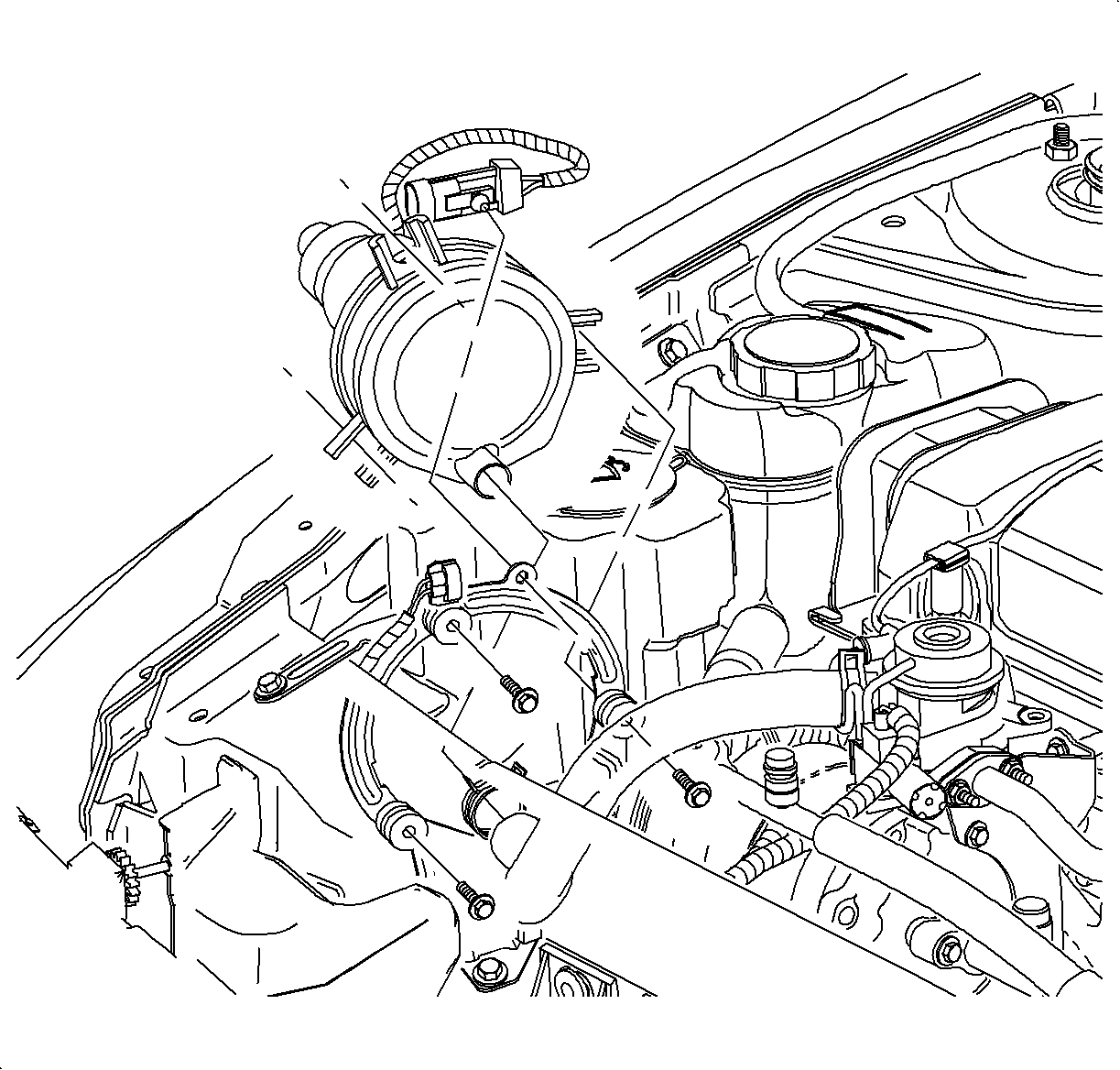
  5. Install the outlet air hose to the air pump air outlet port.
  6. Connect the air pump harness connector. Push in the connector until a click is heard and pull back to confirm a positive engagement.
  7. Install the air pump wiring harness on the bracket.

  Document ID# 883214
1998 Saturn SL2/SC2/SW2